I’ve been working on a book for longer than I’d like to admit. The notes exist as chapter outlines, themes, reference books, saved tweets, and half-formed ideas, all stored in an Obsidian vault. But bouts of procrastination, returning to my project feels like a meeting of a man and an alien. I thought I simply needed to “refresh my memory,” but there was a lot of context I no longer remembered.
Half out of frustration and some curiosity, I tried something different. I fed them into NotebookLM (though, you can connect NotebookLM and Obsidian too) and let it onboard me into my own project. The time away exposed the gaps in my thinking better than my own notes ever had.
I stopped drowning in research after building this 5-step NotebookLM starter-kit workflow
Turn any topic overload into a clean and simple primer.
NotebookLM helped me re-enter my project
Reading summaries is an onboarding step

NotebookLM doesn’t need your notes to be polished. But they need to be focused on one single project per notebook. I uploaded rough chapter notes for the book, and within seconds, it generated a clean summary of the entire project.
NotebookLM quickly helped me recall context. Instead of rereading dozens of scattered documents, I could ask direct questions like “What is the core theme of this book?” or “Which chapters focus on creativity and boredom?” In a few seconds, I had a clearer overview than I usually get after hours of manual revision.
The summaries weren’t perfect. It occasionally flattened nuance or merged ideas that deserved separation. But as a re-entry point after weeks away from the project, it beat re-reading ten documents from scratch. This is the same approach I try out when I use NotebookLM as a learning journal.
Upload all your source documents before generating a summary. NotebookLM’s overview improves significantly when it has more context to work with. PDFs, Google Docs, and plain text files all work.
The AI found gaps I’d missed
The missing pieces became obvious
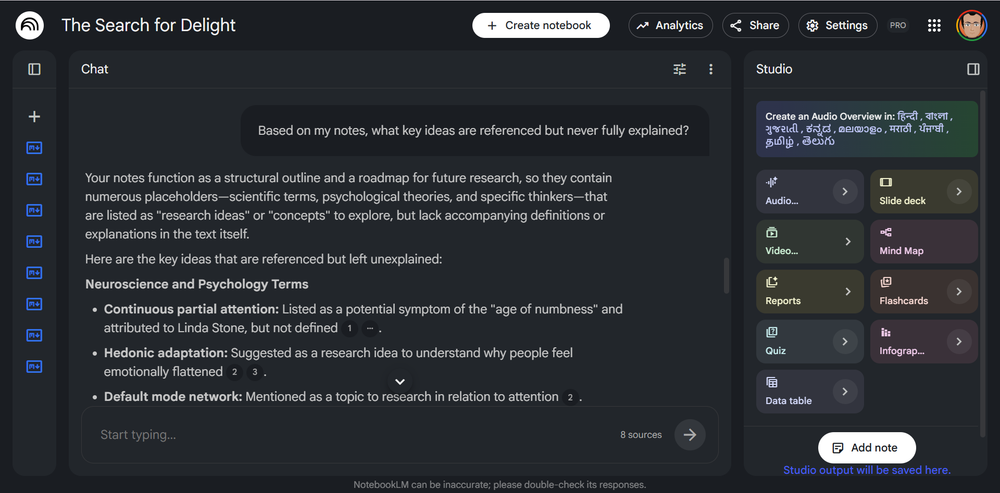
The real value of NotebookLM comes to the fore when you start using prompts as probing questions. They can use your own or the auto-suggestions from NotebookLM. A simple prompt like “What questions does this project leave unanswered?” can take you down a research rabbit hole or two.
In my book project, it flagged that several chapters referenced an emotional framework I’d mentioned early in my notes, but I never actually defined it anywhere. Apparently, I had forgotten and missed it.
This is the benefit of using NotebookLM on your own work (the grounded sources). It doesn’t share your blind spots. It reads what’s actually there in your notes, and nothing else. So, underdeveloped or disconnected ideas will always come to the surface with simple prompts like this,
Based on my notes, what key ideas are referenced but never fully explained?
Gemini integration connects your project to the web
Tap the wider web for more resources
You can use the web search inside NotebookLM or the newer NotebookLM integration inside Gemini. When I asked about books and ideas related to my book, NotebookLM could now pull in external sources like book highlights, research reports, YouTube videos, and Reddit discussions. This pairing of Gemini and NotebookLM helps add more credibility to my writing with cited sources. Both give different results, so I prefer mixing them up. On the Gemini app with NotebookLM integration, I can research outside of NotebookLM. I can continue the chat and improve my notes before re-uploading it to NotebookLM. As you can see in the screenshot above, the Gemini search results are automatically included in the Source panel under a Chats from Gemini dropdown.
This does require some discipline. The moment you open the door to external information, it’s easy to spiral into research rabbit holes instead of actually writing. Also, all the results might not be relevant or come from the gaps in your project. I treat Gemini-powered searches as a separate session from my focused drafting sessions. Sometimes you have to tell Gemini to explicitly cite the sources.
Search for books and research reports about [core theme] that I haven’t mentioned in my notes. Suggest three that might strengthen my argument.
Ask it to challenge you, not just summarize
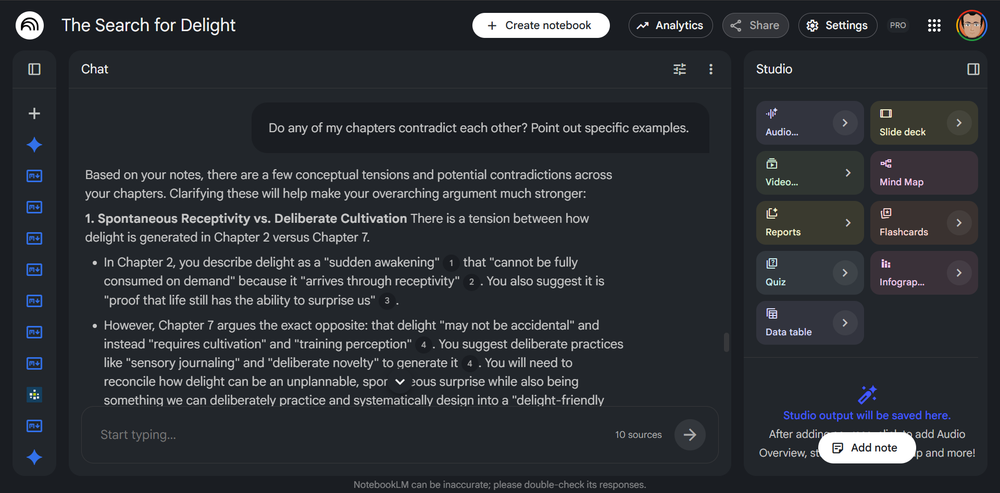
NotebookLM is a great summarization tool. But the more powerful move is asking AI chatbots to stress-test your thinking. I asked, “Does my argument across these chapters hold together, or are there contradictions?” It pointed out that two chapters had conflicting positions on whether delight can be designed or only discovered.
I knew about the breaks of continuity in this early draft. But it helps to have them pointed out. With the right “devil’s advocate” prompt and even NotebookLM won’t spare your feelings.
Do any of my chapters contradict each other? Point out specific examples.
Audio Overview turns notes into a conversation
Hearing your project changes how you see it
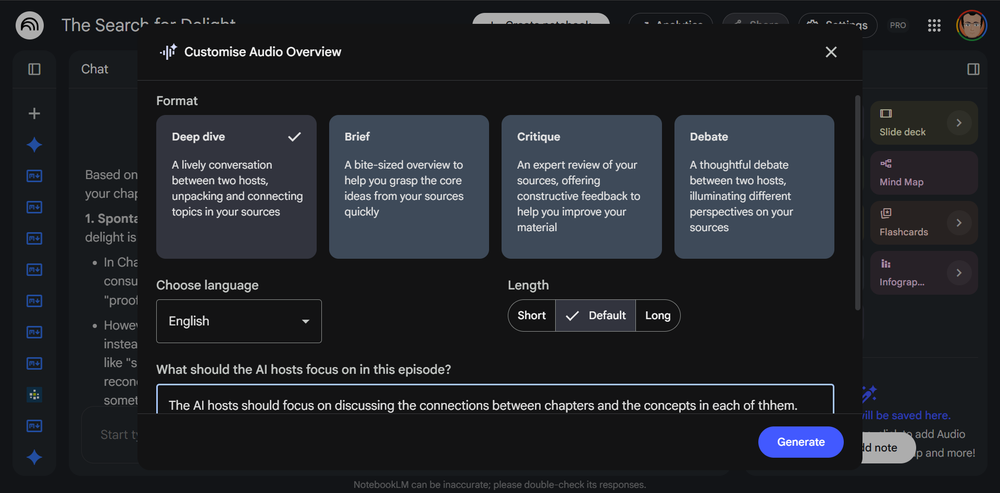
NotebookLM’s Audio Overview feature generates a podcast-style conversation between two AI hosts discussing your uploaded sources. For my book project, hearing my scattered notes discussed out loud (like an actual book promotion podcast) revealed which ideas flowed strongly and which ones fell flat the moment someone tried to explain them.
You can even interrupt, and ask questions by using the Interactive Mode (BETA) feature. For instance, you can drill down into an idea with questions. The AI hosts will respond to your query and then resume the conversation. You can also customize the Format and what the AI hosts should focus on in the podcast. It’s not a bad idea to try out more than one format.
The audio overviews aren’t perfect. They aren’t even a replacement for a real editor or thinking partner. The hosts can be a little breathless and occasionally too gung-ho. But as a solo creator, it’s the closest thing to having someone else discuss your work out aloud before it’s ready to share.
Generate the Audio Overview early in a session, not after. Listening first puts you in a receptive mindset before you start editing — you’ll catch more. The real value comes from seeing your work reframed by virtual outsiders.

- OS
-
Android, iOS, Web-based app
- Developer
-
Google
- Pricing model
-
Free
NotebookLM is Google’s AI-powered research notebook that reads what you upload and helps you transform it into structured summaries, explanations, and visuals.
Now try it on a project you’ve abandoned
Take one neglected project or even a half-finished one and upload whatever notes you have. Then put it through the above process. The answer might surprise you. Then keep adding to your project over time, building dynamic notes that grow richer along with your thinking.
