The Steam Deck OLED is one of my favorite gaming devices of all time. And I don’t say that lightly — I’ve been playing handhelds since the prehistoric times of 1991 when my granddad bought me a Sega Game Gear. I also loved the OG LCD version of Valve’s teeny PC even if I was using my Steam Deck wrong until I made this one change.
Though the likes of the Lenovo Legion Go 2 and ROG Ally X have since far outstripped the Deck in terms of pure horsepower, I still say Valve’s machine is the best handheld PC for most people. Thanks to its ultra-intuitive OS, canny design tweaks and a truly sensational screen, here’s why I wouldn’t swap my Steam Deck OLED for any of its rivals.
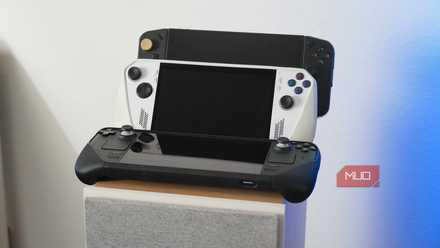
I own 3 PC gaming handhelds, and this is the one I barely use
Until Linux gets serious about multiplayer gaming, my Steam Deck will collect dust while I play on my Windows gaming handhelds instead.
An incredible OLED screen
I’ll always value display quality over pure power
Though I got on well with the launch model LCD Deck, I prefer the OLED model that launched in late 2023 so much more. I won’t lie: my disdain for LCD tech is unhinged. The Nintendo Switch 2’s LCD display is a huge letdown — it’s a screen I find so subpar that I upgraded it with a portable OLED monitor. Thankfully, there’s no reason to replace the Steam Deck OLED’s impeccable panel.
Make no mistake, the upgraded model sports a fabulous screen. Its 720p panel (1200 x 800) may not be the most high-res, but games still look pin-sharp on that 7.4-inch, 90Hz display. Handling of HDR content is also superb, and games like Elden Ring appear incredibly vivid, with the Steam Deck OLED managing to hit 1000 nits of peak screen brightness in HDR-supported games.
Compare and contrast with the Lenovo Legion Go 2, and though its 8.8-inch, 1080p panel is technically higher resolution, contrast levels and color reproduction are nowhere near as impressive as on the Deck OLED’s superior screen. It also doesn’t help that Lenovo’s device tops out at a rather underwhelming 600 nits.
SteamOS remains a cut above
No Windows handheld can compete with the Deck’s operating system

SteamOS is perhaps the next biggest reason the OLED Deck continues to be so easy to recommend. The operating system to beat when it comes to handheld PCs, it’s snappy, intuitive to use, and doesn’t hog a ton of hardware resources. The latter quality ensures that the Steam Deck’s OS isn’t a drag on battery life, which is obviously a crucial factor when evaluating any handheld gaming device.
More than anything, SteamOS just works, and it does so seamlessly. I’ve owned my Steam Deck OLED for a couple of years, and I can count the number of issues I’ve had with Valve’s operating system, not just on one hand, but a couple of fingers.
The Deck boots into Gaming Mode by default, and this Big Picture-esque interface is a delight to interact with. Its clean, uncluttered design lets you browse your game library with ease, viewing screenshots you’ve snapped is a doddle, while it’s also a breeze to hop into the Steam Store whenever you’re feeling flush and want to splurge on some new titles.
Proton is pleasingly open, making it easy to install custom Homebrew plugins
SteamOS also excels thanks to Proton. This compatibility layer ensures the Steam Deck can boot up thousands of Windows games and run on the handheld’s Linux system with minimal issues. Proton is also pleasingly open, making it easy to install custom Homebrew plugins like Decky Loader — an awesome launcher that lets you tweak the Deck’s visuals and sounds in cool and intriguing ways.
Installing custom software onto Steam Deck is much easier if you connect the handheld to a dock paired with a keyboard and mouse in Desktop Mode. That’s a lesson I learned when I turned my Steck Deck into a portable PS5 with this one app.
The trackpads work a treat
One of the Steam Deck’s canniest design decisions

Though they might look a touch gimmicky on first inspection, the Steam Deck’s trackpads come into their own when playing certain games on the handheld.
Acting as an extremely capable replacement for titles that are normally best played with a mouse and keyboard, these trackpads are genuinely lovely to use in first-person shooters, like the 2016 Doom reboot. They also feel super tactile thanks to their resonant actuators that provide subtle haptic feedback that can make scrolling through in-game menus or navigating a map in an RTS game oh-so satisfying on your digits.
I recently completed my first ever playthrough of the legendary Disco Elysium on my Deck, and the point-and-click detective sim was a pleasure to interact with, in large thanks to those wonderfully clicky trackpads. I appreciate said pads so much now that the lack of these inputs on the ROG Ally X is one of the main reasons the more powerful handheld has yet to tempt me.
Valve doesn’t sleep on Steam Deck compatibility
Steam Deck Verified games are updated all the time

A big part of the appeal of the Steam Deck is the ever-increasing number of PC games (both old and new) that work without issue on Valve’s handheld. Thanks to its verification system, “Steam Deck Verified” games are easy to search for through library filters, meaning it’s simple to curate a collection of games on the Deck that you know will boot without additional tweaks.
Thanks to Proton, verified Steam Deck titles are guaranteed to display properly on the Deck’s 720p screen. With these games, optimization has also focused on making them as accessible as possible. That means, in the vast majority of cases, full control functionality is supported, and external launcher issues won’t lay down a barrier to booting into these titles.
Of the 338 games I currently own on Steam, 156 of those are classed as “Great on Deck” when I scroll through my library. Whether it’s enduring the haunted house in space horrors of Alien Isolation, cruising around the seedy streets of Night City in Cyberpunk 2077 or admiring the blustery beauty of The Witcher 3’s sumptuous fantasy kingdom, I know these games will launch with zero fuss thanks to Valve’s handheld-friendly verification process.
Conclusion
The Steam Deck OLED is still the handheld PC I’m most comfortable recommending. With its streamlined OS and growing library of Steam Deck Verified titles, it’s every bit as accessible as the Nintendo Switch 2. That gorgeous screen also gives it the display edge over its competitors.
The only real downside to picking up a Steam Deck? Global RAM shortages have obliterated Valve’s stock, and it’s currently hard to find a Steam Deck OLED (the LCD model has been discontinued) for sums that aren’t way above its official MSRP of $549.
