For over a decade, the Raspberry Pi has been the answer to anyone looking to get started with Linux without wrecking their main computer. You didn’t have to deal with dual-boot installs or virtual machines. A cheap, sub-$50 credit card-sized computer, a microSD card, and your phone’s charging brick were all it took.
But in 2026, you might be able to skip the Raspberry Pi and not regret it. The Raspberry Pi is still here, better and more capable than ever, and it’s still cheap. However, it’s not the only option on the market anymore. For the price you’re paying, you might just be able to find something more powerful, more compatible, or both.
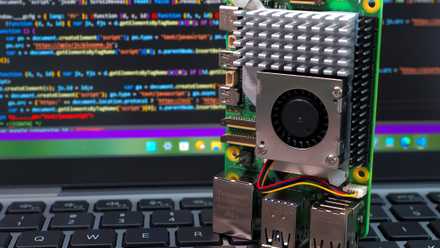
7 Projects For Your New 16GB Raspberry Pi 5
Put your new, ultra-powerful Raspberry Pi 5 to good use.
Cheap isn’t what it used to be
How Raspberry Pi pricing drifted from its original appeal
When it first launched in September 2023, the Raspberry Pi 5 was priced at $60 for the 4 GB variant, $80 for the 8 GB variant, and $120 for the 16 GB variant. However, if you’re looking to pick one up today, the 8 GB variant alone can cost as much as $200 on Adafruit. The 4 GB variant, hailed as the sensible budget option, is selling for well over $100 across retailers, and the top-of-the-line 16 GB Raspberry Pi 5 can go as high as $300—that is, if you can find one in stock.
Part of the reason for this price hike is the DRAM shortage that hit the semiconductor industry in late 2025. What began as a modest price bump in December 2025 has since snowballed into a series of rather aggressive price hikes that have made the latest Raspberry Pi 5 a bit of an aspirational product. The Raspberry Pi Foundation did introduce a $50 entry-level 1 GB model to preserve some of its original spirit, but you’re not running a satisfying Linux desktop on 1 GB of RAM in 2026.
The Raspberry Pi 4 and 5 are still extremely functional, capable machines. But cheap used to mean you could pick one up on impulse. At $200 for the 8 GB variant, the Raspberry Pi is still cheap when you consider the larger computer market, but it’s no longer an impulse buy. You also need to buy a microSD card, power supply, and ideally a case separately, considering you already have a keyboard, mouse, and display to get the entire setup working.
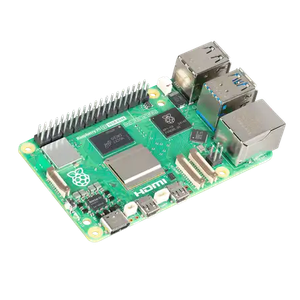
- Brand
-
Raspberry
- CPU
-
2.4GHz quad-core 64-bit Arm Cortex-A76 CPU
- Memory
-
16GB LPDDR4X
- Ports
-
4 USB ports, GbE, microSD, 2 mini-HDMI ports
The fifth iteration of the Raspberry Pi delivers significant CPU and graphics improvements over previous models, incorporating dual 4Kp60 HDMI output, faster USB 3.0 throughput, and a dedicated PCIe 2.0 interface for high-speed peripherals and advanced industrial or hobbyist applications.
The alternatives finally make sense
Mini PCs, old laptops, and boards that offer better value

The rest of the single-board computer market has also gotten its act together. The Orange Pi 5, built around the Rockchip RK35885—an octa-core chip with both A76 and A55 cores running up to 2.4 GHz—punches equally if not more than what the Pi 5 offers at a comparable price. You can pick up its 8 GB variant on Amazon for as low as $183.99 at the time of writing, with the 16 GB variant going for $249.99.
The Orange Pi also supports 8K video output, has an M.2 slot for NVMe SSDs, and even comes with a built-in NPU with 6 TOPS of AI computing power. However, I suspect you’re not getting much use out of that NPU, considering NPUs on laptops are still useless. Regardless, it’s still there for the sake of future-proofing, and the Orange Pi lineup supports Ubuntu and Debian out of the box, so you’re not locked into a simplified Linux distro.

If you’re considering picking up a single-board computer for a home lab scenario, you might be better off buying a mini PC with Intel’s N-series processors. A complete mini PC with an Intel N100 chip, 8 GB of RAM, a 256 GB SSD, and active cooling can be easily bought for under $200. And that’s not a bare board requiring additional accessories. That’s a complete, ready-to-boot computer with an x86 chip, meaning you can run just about every Linux distribution under the sun with no issues. Services like Docker and Proxmox also run flawlessly, and you won’t have to deal with any of the ARM compatibility issues that can still catch Raspberry Pi builds by surprise.

Last but not least, you can also install a full Linux desktop on your Android phone. Android 16 also supports a new, native Linux terminal that’s quite useful. I didn’t buy a Raspberry Pi or mini PC for my home lab and went with an old Android phone instead. It’s not the perfect solution, and you would want something more powerful if you’re looking to run a ton of complicated services, but it’s a great starting point with a device you already own.
The Raspberry Pi still has a place
Where it continues to be the right tool

None of this means that the Raspberry Pi is a bad product. It’s objectively not. The community around it is great, and the volume of tutorials, YouTube guides, and project documentation is almost overwhelming in a good way. Raspberry Pi OS, installable in minutes through the official imager tool, is also one of the most polished beginner Linux distros you can use.
If you’re just learning to code or want to build a specific hardware project using GPIO pins and HATs, the Pi’s ecosystem is still the path of least resistance by a wide margin, not to mention all the community and online support you’ll find when building just about everything.
The Pi also wins when it comes to size and power consumption. A mini-PC is still a PC, regardless of how affordable it gets. The Pi 5 is a credit-card-sized board sipping five volts from a USB-C charger that you can jam into an unimaginable amount of projects.
Ask this before you buy anything
Choosing your first Linux project based on use, not hype
The real issue isn’t whether the Raspberry Pi is good anymore or not. It absolutely is. The issue is that it’s no longer the obvious default recommendation for a beginner who just wants to explore Linux. If your goal is to understand how Linux works, practice the command-line, run a home server, or experiment with self-hosting, a used mini PC will give you a faster, more compatible, and increasingly cheaper experience. You’ll also spend less time fighting ARM compatibility issues and more time tinkering.

I started using Linux terminal on Android and now I can do things no app store tool allows
My phone is more than a phone now.
The Pi’s legendary status is both well-earned and deserved. But before you spend $200 for a single-board computer that you may or may not use once you’re done playing with it, it’s worth asking whether that money could buy you something more powerful, more compatible, and likely just as affordable.
