Claude is having a moment. If you’ve spent any time in AI circles recently, you’ve noticed it quietly becoming the default recommendation for anyone who actually uses these tools for work.
The catch is that Claude Pro costs $20 a month, and Anthropic is fairly aggressive about the token limits on that tier. Heavy users hit the ceiling, get rate-limited, and find themselves staring at a cooldown timer mid-session. Not ideal.
So people, like me, look for workarounds. API access, cheaper tiers, model comparisons. What almost nobody stops to check is whether they already have it.

I asked Claude, ChatGPT, and Gemini to build a simulation, and one winner was obvious
The LLM race stopped being a close contest pretty quickly.
Google AI Pro
We’re still talking about Claude

A lot of people with a Google account end up on Google One eventually. It’s the thing you pay for when Gmail tells you you’re out of storage, or when photos stop syncing. You pay $3 a month for 100GB or maybe $10 for 2TB.
But, with Gemini, Google introduced some new subscriptions. The 2TB storage plan now sits at around $10/month. Google AI Pro, their full AI subscription, runs about $20/month and includes 5TB of storage on top of everything else. That’s double the price, sure. But you’re not just paying for more than double cloud storage — you’re getting a meaningful storage upgrade and the full Google AI stack in one go.
If you’re already on a Google One family plan with three or four people splitting it, the math gets even friendlier. AI Pro family plans exist, and the per-person cost starts looking really reasonable compared to paying Anthropic directly. But wait, this was going to be about Claude. Let’s talk about that.
This subscription packs a lot
and it’s not just a Gemini subscription
Google AI Pro is an access tier that unlocks higher limits across Google’s entire AI portfolio. That includes Gemini models in all the usual places (Docs, Sheets, Gmail), but also Gemini CLI, and something called Google Antigravity.
Antigravity is Google’s AI-first IDE, announced in November 2025 alongside Gemini 3. It largely is VS Code, but heavily modified around an agent-first workflow. You talk to the agent, it writes code, runs terminal commands, reads your codebase, and iterates based on your feedback. Google AI Pro gives you higher rate limits on the agent model inside Antigravity, which is where the interesting part begins.
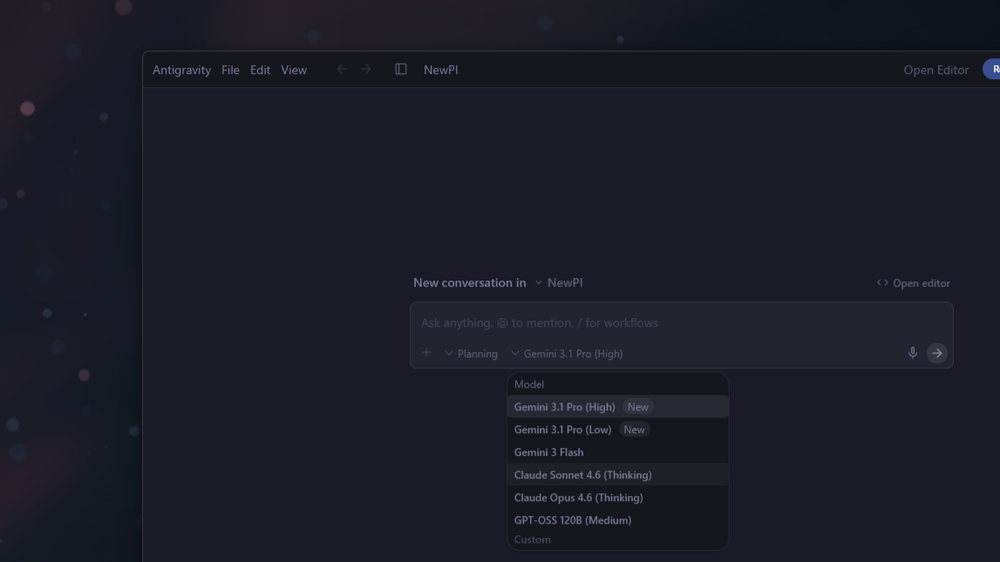
Antigravity ships with Gemini as the default model, but the model selector is right there in the settings, and the list of supported models includes Claude Sonnet 4.6 and Claude Opus 4.6.
Switch the model, and your Antigravity agent starts running on Claude instead of Gemini. Same agentic IDE, same terminal access, same project context. You’re not using an API key or paying Anthropic anything. The billing goes through Google, under your existing AI Pro subscription.
- OS
-
Windows, macOS, Linux
- Developer(s)
-
Google
Google Antigravity is an agent-first integrated development environment (IDE) designed for autonomous software development. Built on a modified Visual Studio Code foundation, it enables multiple AI agents to independently plan, code, and test applications.
You don’t have to write a single line of code
Antigravity is, at its core, a text editor
Nobody is going to arrest you for opening VS Code without a Python file nearby. VS Code — and by extension Antigravity — is fundamentally a text editor with good file management. The coding tools are on top. The base product is just a very capable way to work with text files.
Which means you can use Antigravity exactly the way you’d use any writing environment. Create a folder, throw in some Markdown files, and start working. Drop in your notes, a rough outline, a research dump — whatever you have. The agent can see your entire workspace, and that changes what’s possible.
Tell it to read your notes file and write a first draft. Ask it to take three separate documents and reconcile them into one coherent piece. Point it at a URL and have it pull out the key points before you sit down to write.
If you’ve never touched a Markdown editor, you might find the interface slightly cold at first — there’s no formatting toolbar, and everything is plaintext by default. But Markdown takes about ten minutes to learn, and you’ll thank yourself in the long run.
Taking it outside the IDE
You can take Antigravity outside of the IDE. OpenClaw is an open-source personal AI assistant that works across platforms — Telegram, WhatsApp, Discord, a web interface, whatever you actually use. The important part is that it supports OAuth authentication for providers that offer it, which means you can log in with your Google AI Pro subscription. Better yet, you can directly login with Antigravity.
So, with OpenClaw, you set the model provider to Google Antigravity, but then set the model to Claude Sonnet or Opus. You now have Claude in a third-party tool, and without paying for a Claude Pro subscription.
Get Claude from your Google subscription
Of course, the access won’t be the same as a Claude subscription from Anthropic. You can get the model through Google AI Pro, but the tools like Claude Code, or Claude Design, will require a Claude subscription.
If you already pay for any Google storage tier, upgrading to AI Pro and switching the Antigravity model to Claude is probably the lowest-effort path to Claude access that exists right now. I know I’m starting to sound like a salesman, but the $20 AI Pro subscription just makes sense. Even if you just want storage.
