
When you hunt for the best Windows laptop for video editing to start a YouTube channel, one issue stands out. The wrong machine will lag when you scrub through video files. I went through that pain when I tried to start a side hustle on a Dell Inspiron with just 8 GB of RAM. Sure, I knew I could use proxies to speed things up, but they blow up file size and eat time. So whether you cut videos for years or you just opened your first editor, I hope this guide gives you something useful.
Editing comes down to tons of small choices that stack into one solid project. The first hurdle hits when you try to decode all the laptop jargon. It can make your eyes glaze over fast. The upside? You don’t need a computer science degree to figure it out. I’ll walk you through what matters in a video editing laptop and point you toward a few machines I’d trust.
What to look for
You build skill in YouTube editing through a mix of technology know-how and creative storytelling. That sets a high bar for any editing laptop, since your system must handle heavy workloads.
You might use YouTube’s built-in editor for ease, CapCut for access, Premiere Pro for its deep toolset, or DaVinci Resolve for its strong free version. Each option brings either fast edits through templates or some strain during long, complex projects.
The CPU stands as the core part of any editing laptop. On Windows, you pick between Intel and AMD. I suggest you aim for 6 to 10 cores, based on how heavy your raw files feel and how long your final video runs.
Related: Fastest laptops: 5 Budget, business, and gaming picks
The GPU handles graphics tasks and frees the CPU to run other apps. If your software skips GPU support, the CPU takes the full load for 4K work.
RAM plays a big role too. I suggest 16 GB as a base, 32 GB for most setups, and 64 GB if you run many apps at once. Creative apps use all CPU cores, so strong multicore power helps a lot.
Best value option: Lenovo Yoga Slim 7x
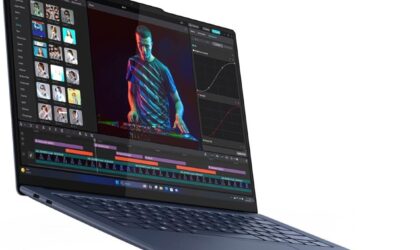
Lenovo Yoga Slim 7x
Copilot PC laptop with 14.5-inch touch screen
The Lenovo Yoga Slim 7x strikes a nice balance between price and power, with a sleek look, long battery life, and a sharp OLED screen that shows rich color and deep blacks. Better visuals can boost your edits and help pull in more views. Once you learn the basics of editing, you can connect with viewers across many platforms. Skill matters, but gear plays a role too.
The Yoga Slim 7x packs serious speed. Its Snapdragon X Elite chip hit a 12,634 score in Geekbench 6 multi-core tests, which puts it ahead of many laptops in this price range. From what I’ve seen, users treat it as a strong multitasking tool. Some run over thirty tabs with no slowdowns.
My top recommendation: Lenovo Yoga Pro 9i
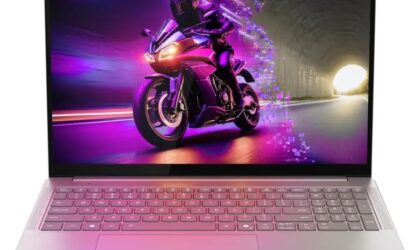
Lenovo Yoga Pro 9i
16-inch Intel Ultra 9 laptop with NVIDIA GeForce RTX 5050
The Yoga Pro 9i features a 16-inch, 120 Hz OLED touch screen that stays bright for outdoor use, and Lenovo software helps keep colors accurate in the sRGB space.
I like that the Yoga Pro 9i offers more ports than the M5 Pro MacBook Pro, with USB-A, HDMI, and an SD card slot. For an editing laptop, I focus on I/O, such as USB and Thunderbolt ports, solid connectivity, an HDMI output, and either a dedicated GPU or strong CPU and GPU support for media codecs. Think about how many video outputs you need on the go. An HDMI port covers most cases, since you can connect to a TV or projector with ease.
The Yoga Pro 9i 16 also brings a stunning OLED panel. You can pick between 2,880 x 1,800 or a sharper 3,200 x 2,000 resolution. I like the smooth curves along the edges, and the build feels tough and durable.
High-end choice: Lenovo Legion Pro 7i Gen 10 Intel (16-inch) with up to RTX 5090
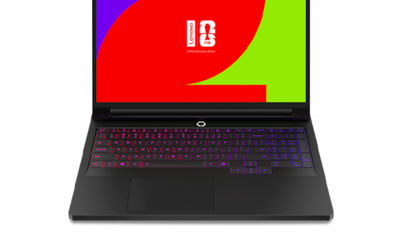
Lenovo Legion Pro 7i Gen 10 Intel (16-inch) with up to RTX 5090
The latest Lenovo Legion model jumps to Nvidia’s GeForce RTX 5090 GPU. That brings a high price, but it also delivers strong power for users with high demands. You get rich contrast, solid cooling, and low noise during heavy use.
Storage fills up fast when you juggle several video projects. You can carry external drives for backup, but that adds bulk and strain. That’s why I like that the Lenovo Legion Pro 7i Gen 10 includes a pair of M.2 2280 NVMe slots and DDR5 SO-DIMM slots. With storage demands on the rise, you can expand up to 64 GB more RAM and add another 2 TB or more of SSD space down the line.
Related: RAM shortage 2026: How Lenovo, HP, Dell, Apple, and other PC makers face rising costs
Like many premium systems, the Legion Pro 7i Gen 10 includes software that adds extra control. Legion Space lets you switch performance modes, enable GPU boost, track system stats, and more.
Before you go
Picking the right laptop can shape how fast you grow on YouTube. A weak system slows your flow, while a strong one keeps your ideas moving from cut to final export with less friction.
Focus on the core parts—CPU, GPU, RAM, and ports—and match them to your editing style and project size. You don’t need the most expensive machine, but you do need one that won’t hold you back when your skills level up.
Each of the options here fits a different budget and workload, so pick what lines up with your goals. In the end, your creativity drives the channel, but the right gear helps you keep pace.
Grigor Baklajyan is a copywriter covering technology at Gadget Flow. His contributions include product reviews, buying guides, how-to articles, and more.
